
Github Agent
Where you can mention Cosine
Section titled “Where you can mention Cosine”- Issue and PR comments
- Inline review comments on files
- The overall PR review summary
How to mention
Section titled “How to mention”Cosine will only pick up comments if the repo is integrated in Cosine Cloud as a project.
In your project level settings, you will find this:
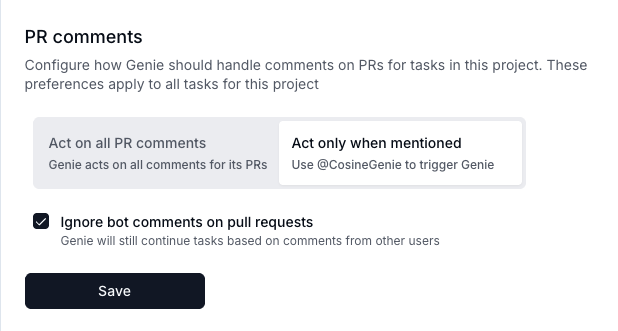
Including @cosinegenie in a comment will cause Cosine to pick it up, read it and decide how to respond.
Example:
@cosinegenie please fix the failing test and update the READMEWhat happens after you mention Cosine
Section titled “What happens after you mention Cosine”- Cosine reacts with 👀 to show it saw your comment.
- Cosine reads the conversation and gathers helpful context.
- For review comments, Cosine also looks at the file and nearby lines you referenced.
- Linked images and files (within size limits) can be used for additional context.
- Cosine decides the best next step. Typical actions include:
- Replying with a concise answer
- Making code changes in the current PR
- Starting a new task (if work is outside the current PR)
- Continuing work on an existing Cosine task
- Addressing all unresolved review threads on the PR
- Asking for clarification if the request isn’t clear
If changes are needed, Cosine will ask for confirmation before proceeding.
Confirming and directing Cosine
Section titled “Confirming and directing Cosine”When Cosine asks for confirmation, it will indicate how to respond. If in doubt, you can reply with:
yes— proceed on the existing task (or start a new one if needed)fork— create a new task branching from the current Cosine taskiterate— continue on the existing tasknew— start a new taskreply— have Cosine post a textual answer instead of making changes
If Cosine asks a clarifying question, just reply in plain language.
PR association and auto‑pickup
Section titled “PR association and auto‑pickup”- If a PR was created by a Cosine task, it’s automatically linked to that task.
- Teams can enable “auto‑pickup” so Cosine can respond to PR comments and reviews even without an explicit mention.
- If Cosine is currently busy on the linked task, it will queue your request and let you know.
Review behaviour
Section titled “Review behaviour”- For review comments, Cosine replies once per thread (to the first comment), not to every message in the thread.
- Asking Cosine to “handle all comments” makes it address all unresolved review threads and then post a brief summary at the PR level.
- If the overall PR review is being handled, Cosine avoids replying to individual review comments separately.
Where replies appear
Section titled “Where replies appear”- Issue/PR comments → Cosine posts a PR‑level comment
- Review comments → Cosine replies in that specific thread and uses 👀 on the root comment
Examples
Section titled “Examples”- “@CosineGenie can you explain why we chose X over Y?” → concise answer
- “@CosineGenie fix the type error in foo.ts” → Cosine asks to confirm changes;
yescontinues or starts a task - “@CosineGenie handle all comments” → Cosine works through unresolved review threads and posts a summary
- “@CosineGenie” with no details → Cosine asks a brief clarifying question
- GitHub’s refresh logic on PRs is not the best, which means often you will not see Cosine’s reaction or responses to comments until you refresh the page. Please be aware of this when mentioning Cosine.