Cosine is a complete ecosystem for AI-native software engineering: a CLI, a native desktop app, and a cloud platform with remote agents. Three surfaces, one unified system.
We built Cosine around the simple belief that coding agents should reflect developer taste.
Most products in this category still optimise for first impressions, simplified workflows, and the broadest possible audience. We think that is the wrong way to build for serious engineers.
Cosine is built for developers who care about architecture, maintainability, visibility, directness, and control. Our focus is on the developers who have to work inside real codebases, respect existing systems, and live with the consequences of every commit they make.
That point of view shapes the whole product. Cosine is a complete system for AI-native software engineering: a CLI, a native desktop application, and a cloud platform. Three surfaces, one agent runtime, built for developers who share our taste in tools and software.
From your first terminal command to remote agents running in parallel, Cosine gives engineers a single agent system that scales with how serious developers already work, rather than forcing them into a watered-down workflow designed for mass appeal.
That is the product we wanted ourselves. So that is the product we built.
Built the way developers want to work
Cosine is opinionated by design. We built it for engineers who want a coding agent to behave like a serious engineering tool: grounded in real environments, capable of taking action, and accountable to the standards of a real codebase.
This is where our philosophy differs from much of the market. We have deliberately chosen a more demanding path; one that prioritizes visibility over simplification, usefulness over likability, and maintainability over shallow velocity.
We believe that is the right tradeoff for developers with taste, because taste in engineering is not only about aesthetics. Developer taste means judgment: knowing what makes a system trustworthy, what makes code maintainable, and what separates a demo from a tool you can rely on every day.
Agents should:
- Work in the environments developers already trust
- Show their work so users can inspect, redirect, and intervene
- Speak plainly and stay grounded in evidence
- Respect the architecture and conventions of an existing codebase
- Support different modes of control, including planning, autonomous execution, and parallel work
- Make long-term code quality a first-class concern
Most of all, developers should not have to assemble this experience themselves from disconnected tools, polite-but-unhelpful models, and workflows that create more slop over time.
Cosine is our answer to that.
One agent, every surface
Developers are opinionated about where they work. Some are most comfortable in the terminal. Some want a native application alongside their existing tools. And all of them, eventually, want more than a single machine can give them.
We did not want each of these environments to become a separate product with different assumptions underneath. If developer taste matters, the product should respect the surface someone prefers without forcing them into a different operating model.
Cosine is designed as one underlying agent system across CLI, desktop, and the cloud. The interface changes with the environment, but the standards stay the same: visibility, control, portability, and output that holds up in a serious codebase.
Developers can start with the surface that matches how they like to work, and teams can expand usage without relearning the product or compromising on quality.
Cosine CLI
Cosine CLI is the flagship surface for the agent and the core building block of the wider system. It is terminal-native, fast, and built for real engineering work.
For developers with taste, the CLI matters because it keeps the system close to the action. It offers the directness, composability, and visibility that serious engineers expect. You can see context, understand what the agent is doing at all times, and stay in control while it works.

It also makes parallelism native to the product. Developers don't just want a single thread of agent work; they want to run multiple tasks concurrently, manage them clearly, and maintain control as work branches and scales. We built Cosine with that assumption from the start.
But the CLI is not a separate product. It is one surface of the same system that also powers desktop, VS Code, and the cloud platform.
Read the technical blog for a deep dive into how Cosine CLI works.
Cosine Desktop
Our native desktop app gives users a command centre for agent-driven work, with the same core runtime underneath. It is useful both for developers who want a richer interface and for teams that want powerful agentic workflows with stronger visibility and coordination.

Outcome-first, users state goals, and the app plans and executes complex, long-running tasks. Think of it as a command centre for multi-agent coordination across research, drafting, analysis, and execution.
For engineers who share our taste, Cosine Desktop is your surface for planning, monitoring, reviewing, and steering complex work while maintaining standards.
Cosine's shared architecture also enables continuity. Work can move across surfaces rather than being trapped inside a single interface.
Cosine Cloud
Local execution is powerful, but some workflows need more than a single machine can provide. That is where Cosine Cloud comes in.
More tasks than your machine can handle, more parallelism than a single worktree allows, and continuity across devices when your laptop closes. With asynchronous background continuity, the platform takes over without a context switch. Developers use the same toolchain and the same agent, just at a different scale.
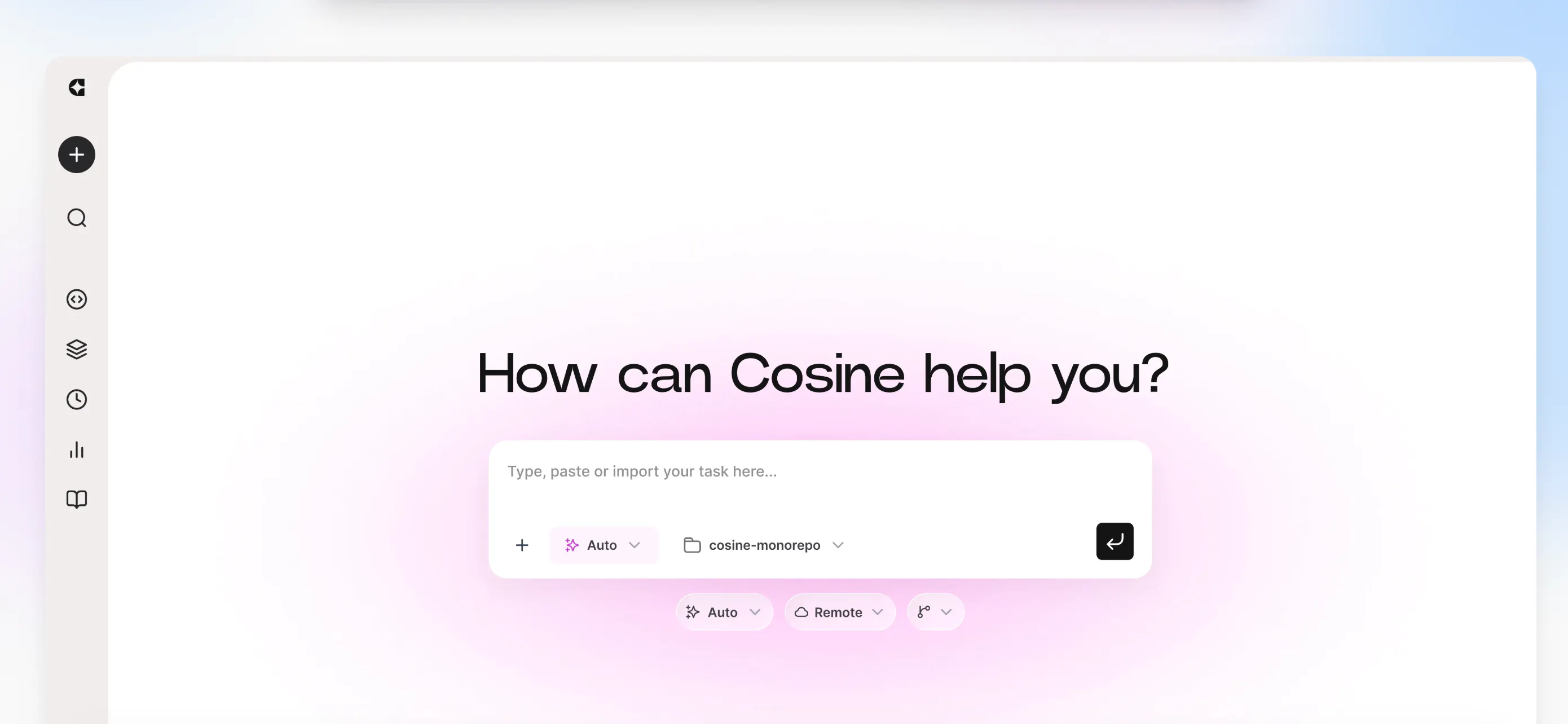
We don't think scale should come at the cost of taste. More power should not mean less visibility or less control.
When you delegate to the platform, each subtask runs its own MicroVM, a hardware-isolated environment with a dedicated kernel that boots in roughly 125 milliseconds. Agents run simultaneously on isolated worktrees, produce diffs independently, and nothing merges until you review it.
Control over the model
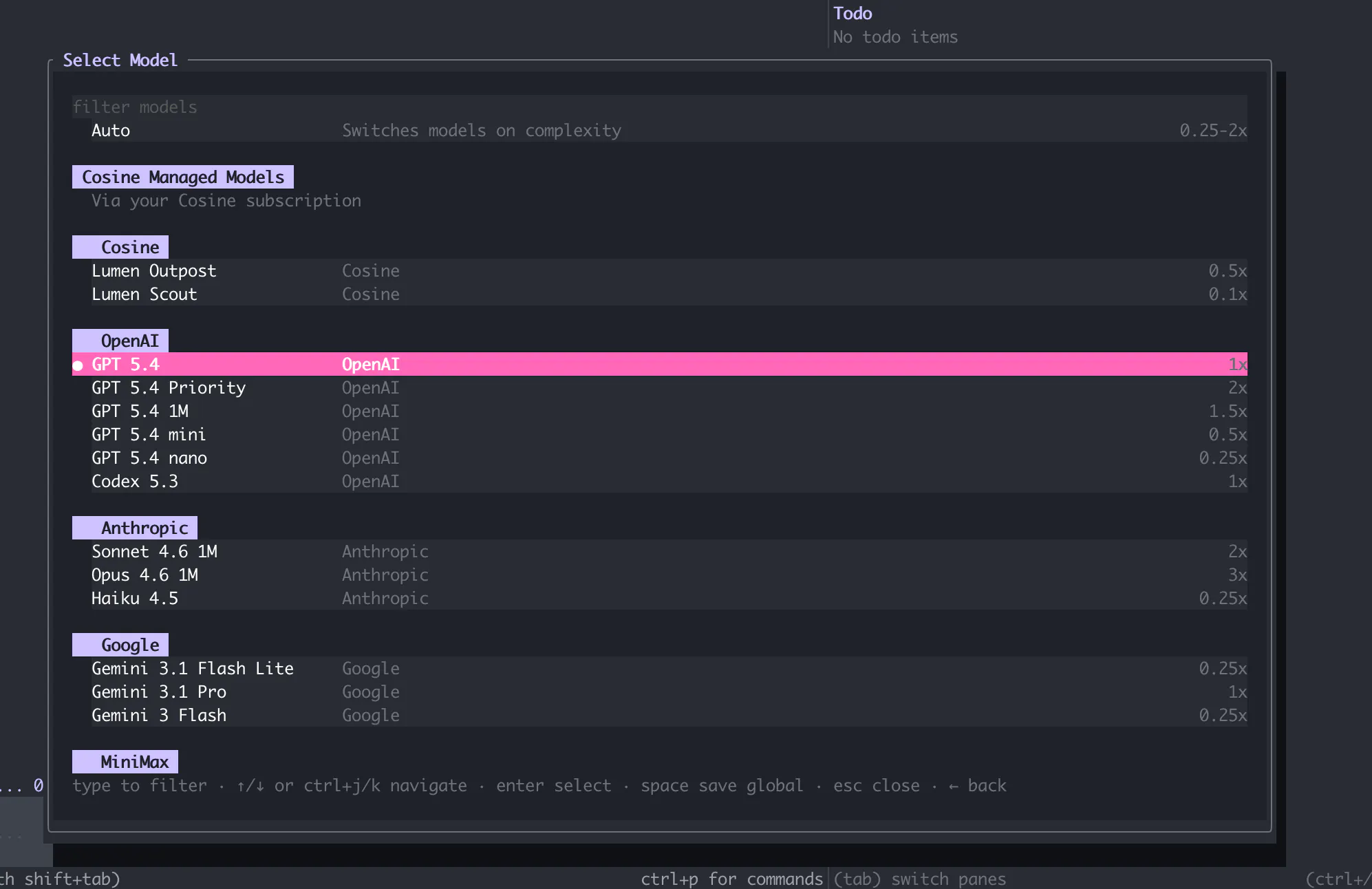
Control is central to the Cosine experience, from the terminal to the cloud platform. This philosophy also extends directly to the core intelligence powering the agent. Just as we believe developers should be able to choose the surface that fits how they work, we believe they should choose the model that fits the task at hand.
Cosine supports both managed models and bring-your-own-key setups, so teams can keep control over cost, provider choice, and deployment constraints without sacrificing the product layer.
Different tasks require different model strengths. Architectural constraints – whether that's cost, performance, or data governance – often dictate which models can be deployed. That's why our CLI also has an "Auto" model selector that selects the model based on the task's complexity.
ChatGPT and Claude subscriptions can also be utilized in Cosine.
Unleash the Swarm
One feature we're particularly excited to highlight in this release is Cosine's Swarm mode.
Swarm mode is one of the clearest expressions of our taste. Real engineering work is rarely a single linear session. It is investigation, planning, delegation, implementation, review, and correction happening across multiple threads. We think coding agents should reflect that reality rather than flatten it.
Instead of forcing all work through one opaque conversational thread, Swarm lets developers run and manage parallel tasks within a unified system.
A single prompt can spin up multiple specialised subagents: explore agents that read but do not write, web agents that research, general agents that implement, and the supervisor model that coordinates them. These subagents have their own tool context, token budgets, and trajectories.
Swarm reflects the broader product philosophy behind Cosine: more visibility, more control, and a system that matches how real engineering work happens. It is built for developers who want leverage without giving up oversight.
For engineers with taste
With Cosine, we deliver a simple yet powerful promise: a coding agent built for developers who care about the same things we do.
That means clarity over theatrics, control over abstraction, maintainability over short-term velocity, and tools that meet engineers where they already work without lowering the bar.
Whether that is the terminal, the editor, a desktop application, or the cloud, Cosine brings the same standards to every surface.
If you already use coding agents, try Cosine. Not because the category needs explaining. Because this is what it looks like when a team makes deliberate decisions about how the product should work, how the model should behave, and what quality actually means in a real codebase.
We built the product we wanted ourselves, for developers who share our taste. Now it's ready for you.
The fastest way to get started is with Cosine CLI. Available now on macOS, Windows, and Linux.
- macOS: brew install CosineAI/tap/cos
- Windows: winget add Cosine.CLI
- Linux: curl -fsSL https://cosine.sh/install | bash
For enterprise deployments – VPC, on-prem, or air-gapped – talk to our team. For everything else, the docs are here.