Cosine CLI 1.16 adds built-in fuzzy and keyword search, with no external dependencies. FFI, OS pipes, and static linking for fast streaming.
Cosine CLI 1.16 introduces a major upgrade to codebase exploration, built into the Cosine CLI rather than relying on external tools that must be installed on the user’s machine.
Overview
In earlier versions, Cosine’s LLM tool calls for search to be performed by instructing the CLI to execute command-line tools like “ripgrep” for keyword search and “fzf” for fuzzy file search. Those commands would produce standard output, which would be parsed and returned to the LLM so it could decide what to do next. This worked, but it came with a pain point: the CLI tool required external dependencies installed on the user's machine to perform fundamental operations; users could remove them (or never want them), and compatibility differences across operating systems meant tool functionality wasn’t always guaranteed.
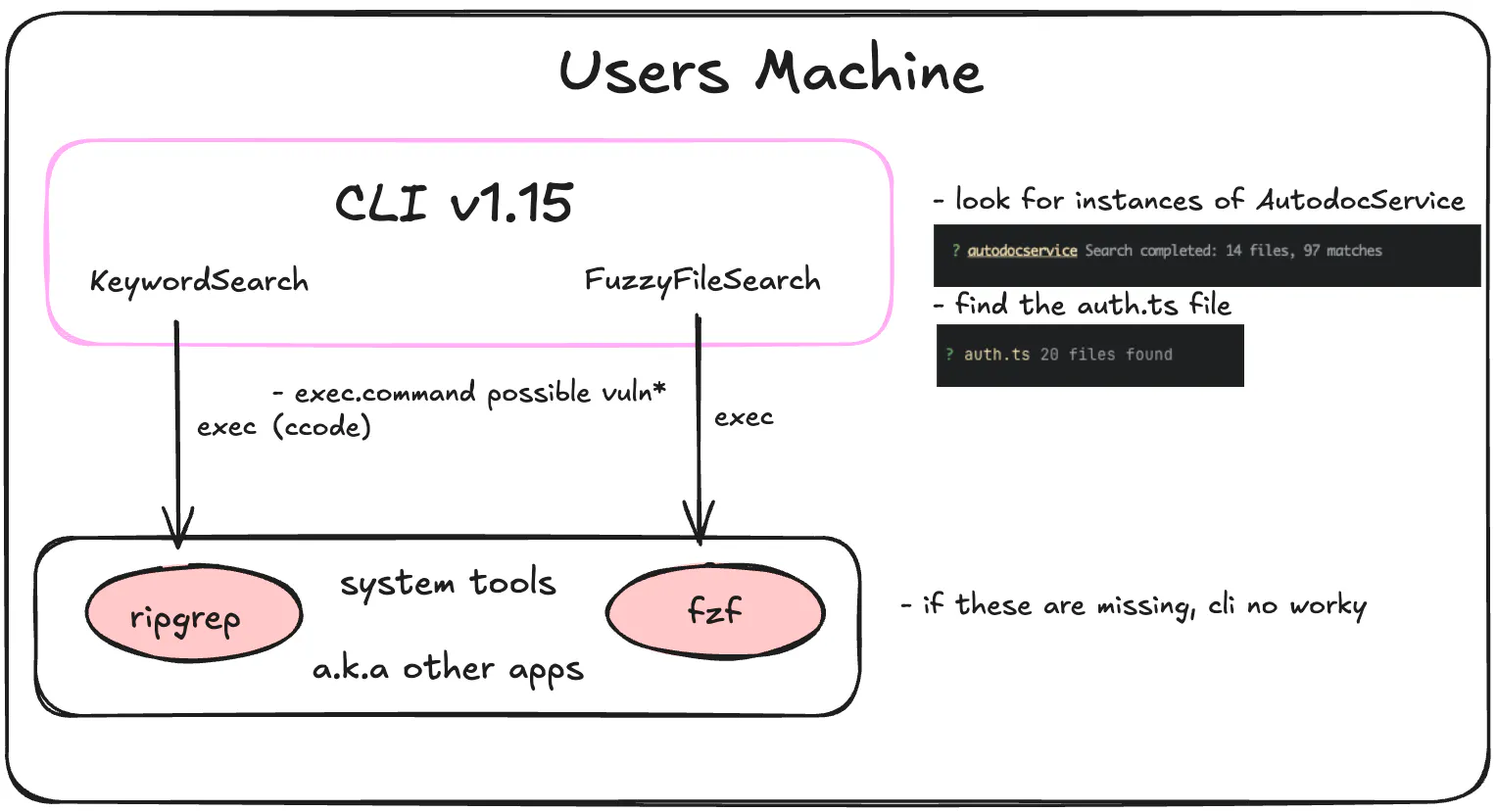
Cosine CLI 1.16 replaces that approach with a first-class internal search architecture. Fuzzy file search is now implemented directly in Go, so it ships as part of the CLI with no external binary dependency. Keyword search is powered by an embedded search engine called ggrep, implemented in Rust using the same underlying packages as ripgrep. Our goal is to deliver ripgrep-level performance while ensuring a consistent experience across environments and eliminating the need for external dependencies.
For users, the benefits are immediate. First, Cosine CLI 1.16 has fewer dependencies, with fzf and ripgrep removed from the install list. Second, better under-the-hood performance and responsiveness: results stream as they’re found, so the CLI can start returning useful matches immediately rather than waiting for a full external command to finish and then parsing its output.
Technical deep dive
The new keyword search path embeds a Rust-written search engine directly into the Cosine CLI binary. The CLI itself remains written in Go, but it relies on Rust for performance-critical search. The integration relies on three building blocks: FFI, an OS pipe, and static linking.
FFI
Foreign Function Interface (FFI) is the mechanism that enables Rust and Go to communicate within a single binary. Our perforant Rust-written search engine exposes a C-compatible function.
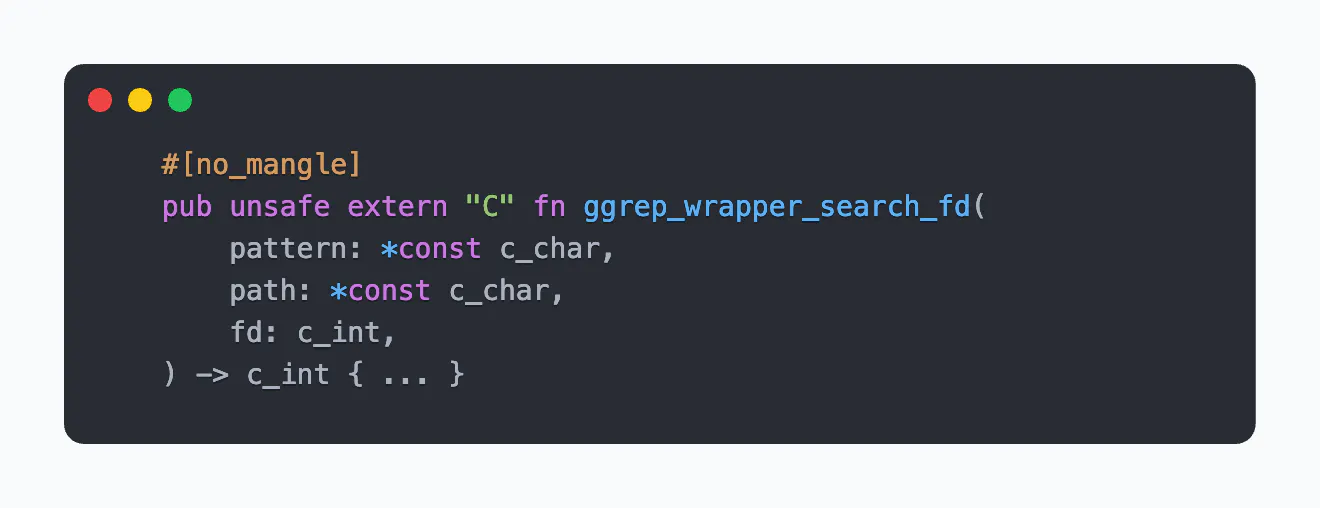
For now, it’s important to pay attention to the fact that parameter types are Rust's equivalent of C data types. That’s important because in Go, we can use cgo to let Go packages call C code. We declare the same function with the same parameters and data structure in Go as we did in Rust.
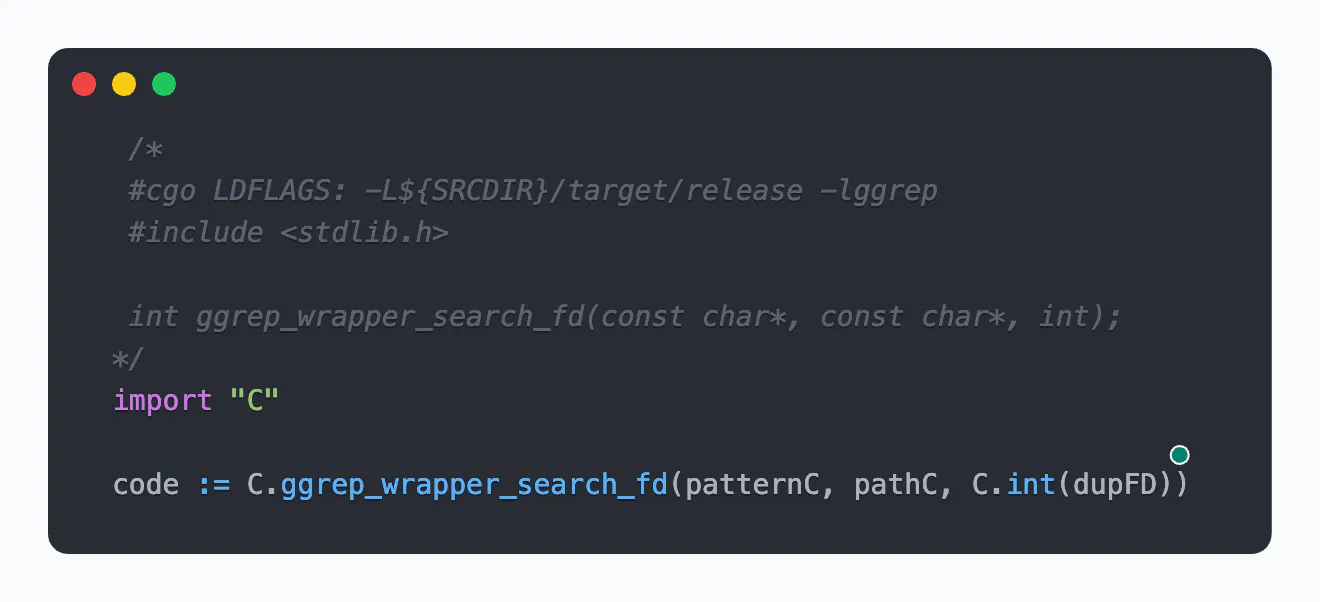
This way, we use the C language as a middleman interface to facilitate function calls and pass data to and from Rust and Go. If you’ve ever seen a multi-language repository and wondered how they function together, this is likely how.
OS Pipes
Our original implementation of this tool executed a ripgrep command and read the final output from global STD_OUT. This was awkward to isolate per search and inefficient when multiple searches were run concurrently. We improved on this by creating a concurrent, high-performance data stream using an OS pipe.
The pipe exists at the kernel level; it’s short-lived, has a finite capacity, has no persistent data, and is ideal as buffer storage for our Rust and Go processes to use as a medium for data transfer. It functions like a live stream of data from the producer to the consumer, with strict blocking behavior that creates backpressure (allowing the consumer to slow down the producer). This enables our Go process (the consumer) to regulate Rust's (the producer) behavior. If Rust writes quickly but Go isn’t reading, the buffer can fill, and Rust will block; keeping the pipe draining and preventing stalls on large result sets is crucial.
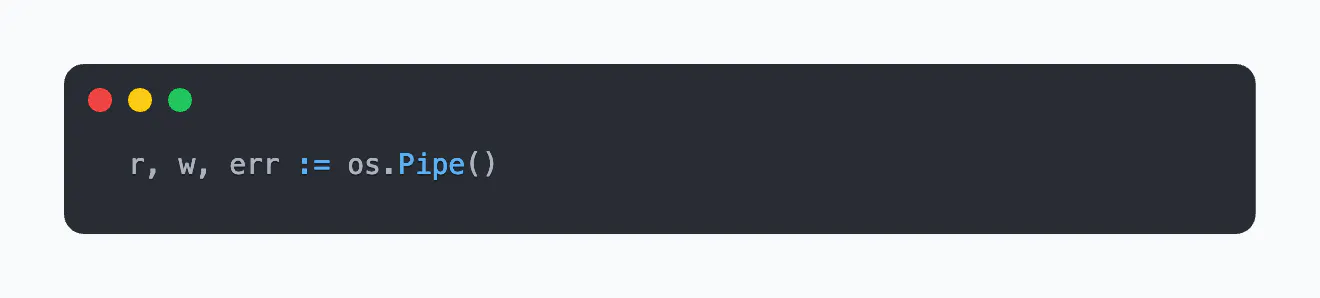
Go creates the pipe, passes the write end, as a file descriptor (FD) to Rust, and holds onto the read end.
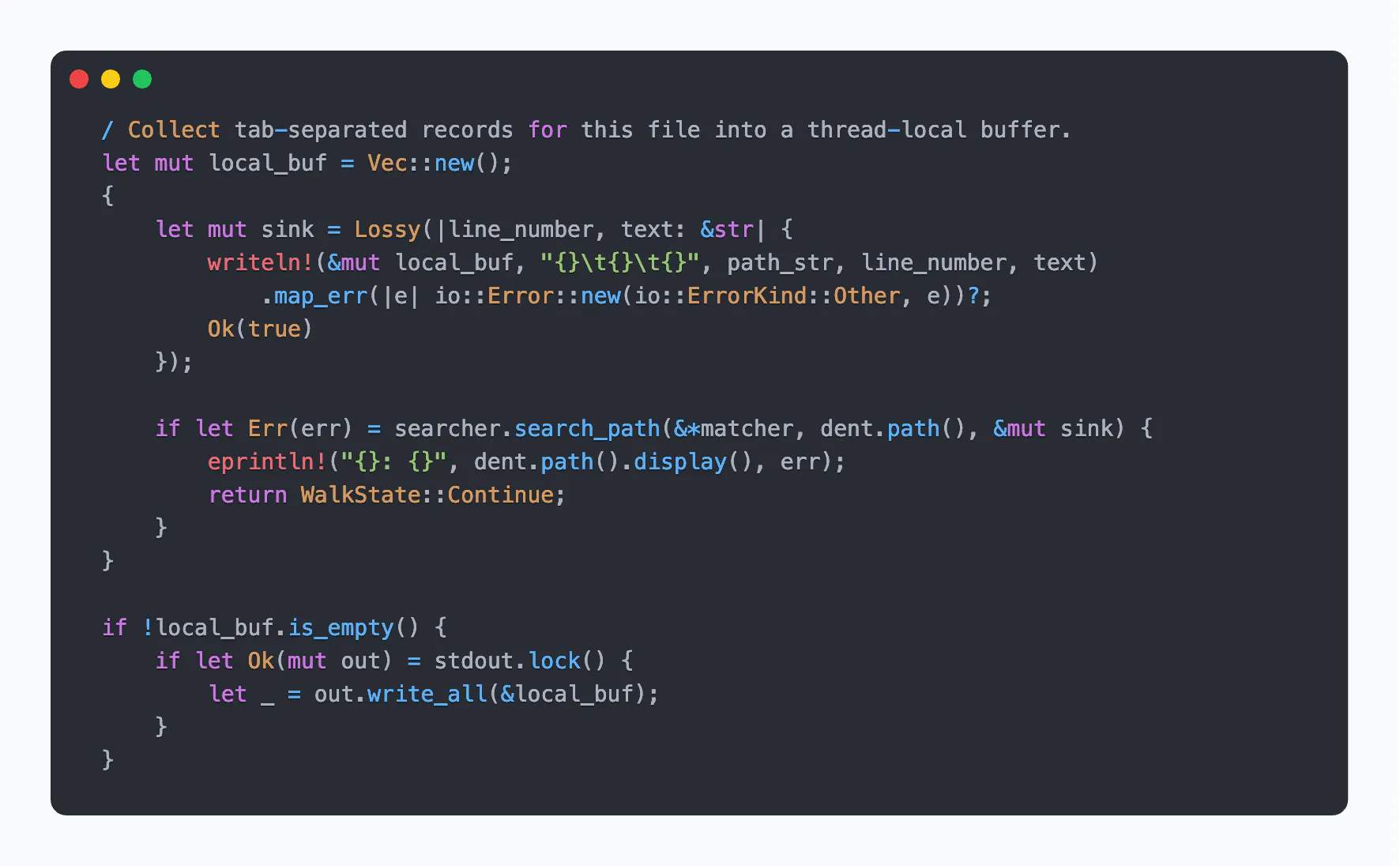
On the Rust side, we take that FD, and the rest of the query, and perform a parallel directory traversal, inspecting each file for matches and quickly piping out results as they are found. The following code runs for each file, creating a buffer, searching the file, and writing any matches in the format ‘path<TAB>line_number<TAB>text’ to the buffer. The contents of the local buffer are written to the FD using a stdout.lock() to ensure multiple threads don't interleave their output, locking the FD only once per file. This way, we’re achieving high output speeds while avoiding any data corruption.
A Statically Linked Binary
So, why bother to go through all of this – from the kernel-level plumbing, to the complexity of cross-language interfacing – if these processes already work? Our primary goal is to provide the simplicity of a single shipped binary.
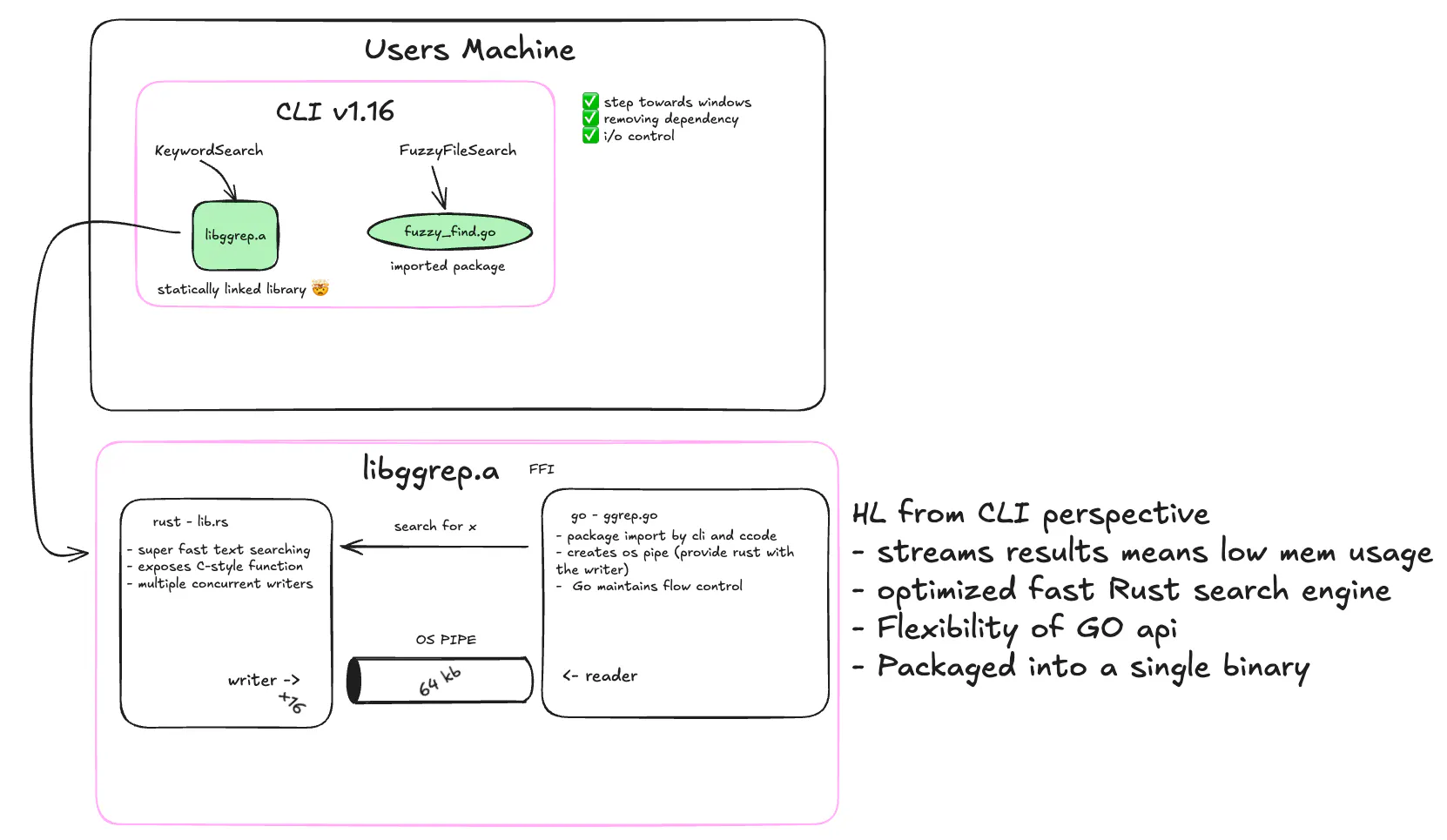
We compile the Rust search engine into a static library and link it into our Go binary. That means when you download the CLI, you’re actually getting both Go and Rust code in one executable. There’s nothing else to install as the search engine is already built in.
In this way, Cosine maintains simplicity in distribution through static linking. The Rust engine is compiled into a static library and linked into the Go binary at build time. The tradeoff is a larger executable, but a streamlined approach: the Cosine CLI is a single binary with a built-in search engine.
Built-in search
Cosine CLI 1.16 introduces a consistent, high-performance search engine built into our own architecture. Users get faster feedback, fewer setup issues, and stronger cross-platform support, further enabling our expansion for Windows (work in progress).
Under the hood, it’s more efficient engineering: Go for product integration, Rust for ripgrep-level performance, FFI for language bridging, an OS pipe for streaming, and static linking for single-binary distribution.
CLI 1.16 is live. Update your CLI or install it fresh via:
- macOS: brew install CosineAI/tap/cos
- Linux: curl -fsSL https://cosine.sh/install | bash